PRISM Clinical Observation, Feedback & Assessment

A smarter way to observe teaching, provide meaningful feedback, evaluate clinical performance, and document candidate growth.

PRISM helps teacher preparation programs manage clinical observations, video-based feedback, mentor and supervisor evaluations, and candidate performance assessments in one integrated platform. AI-assisted tools support reflection and feedback while educators remain responsible for all evaluation decisions.

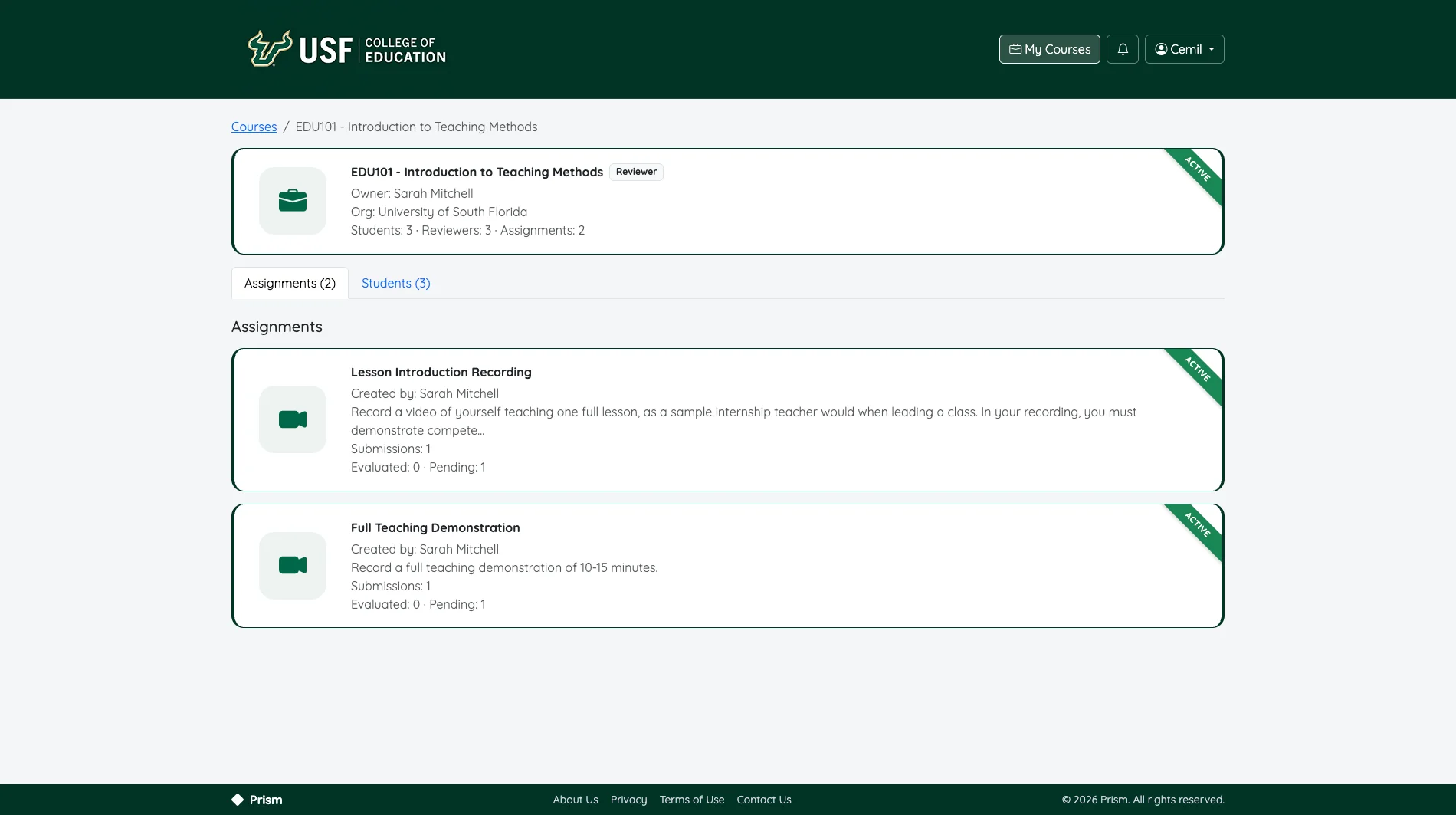
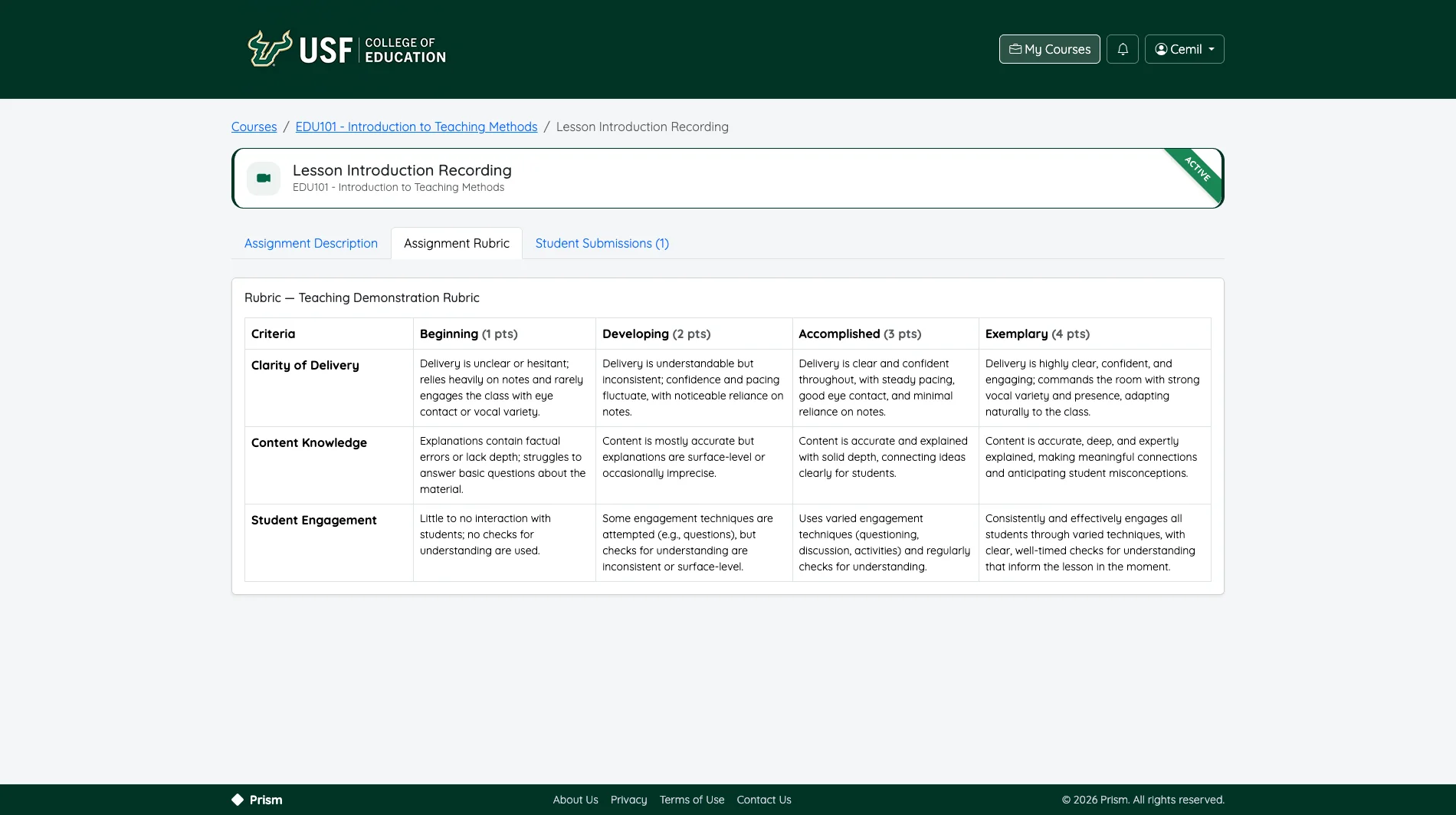
A PRISM course page listing its assignments, each showing submission and evaluation progress

Inside PRISM

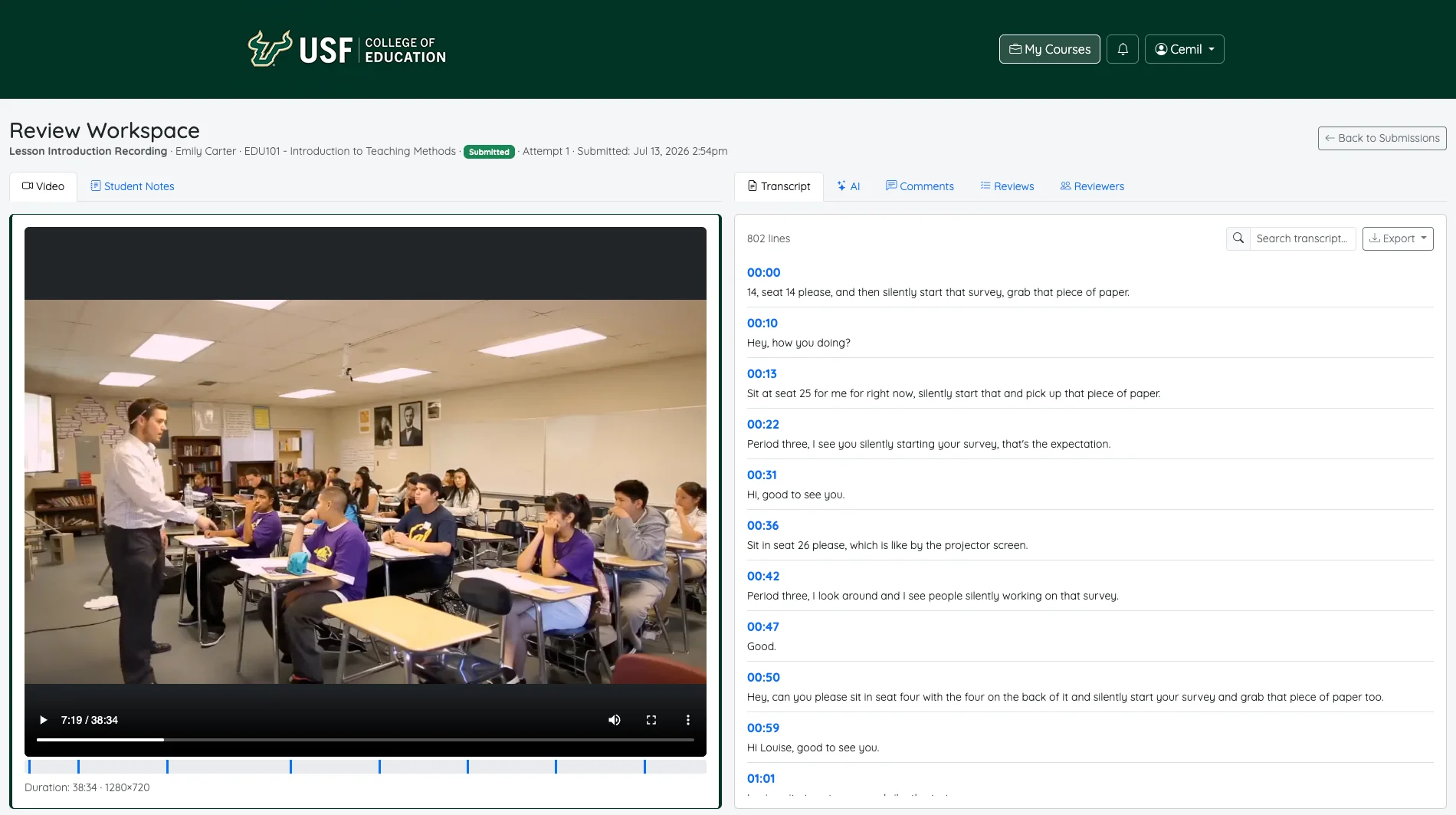
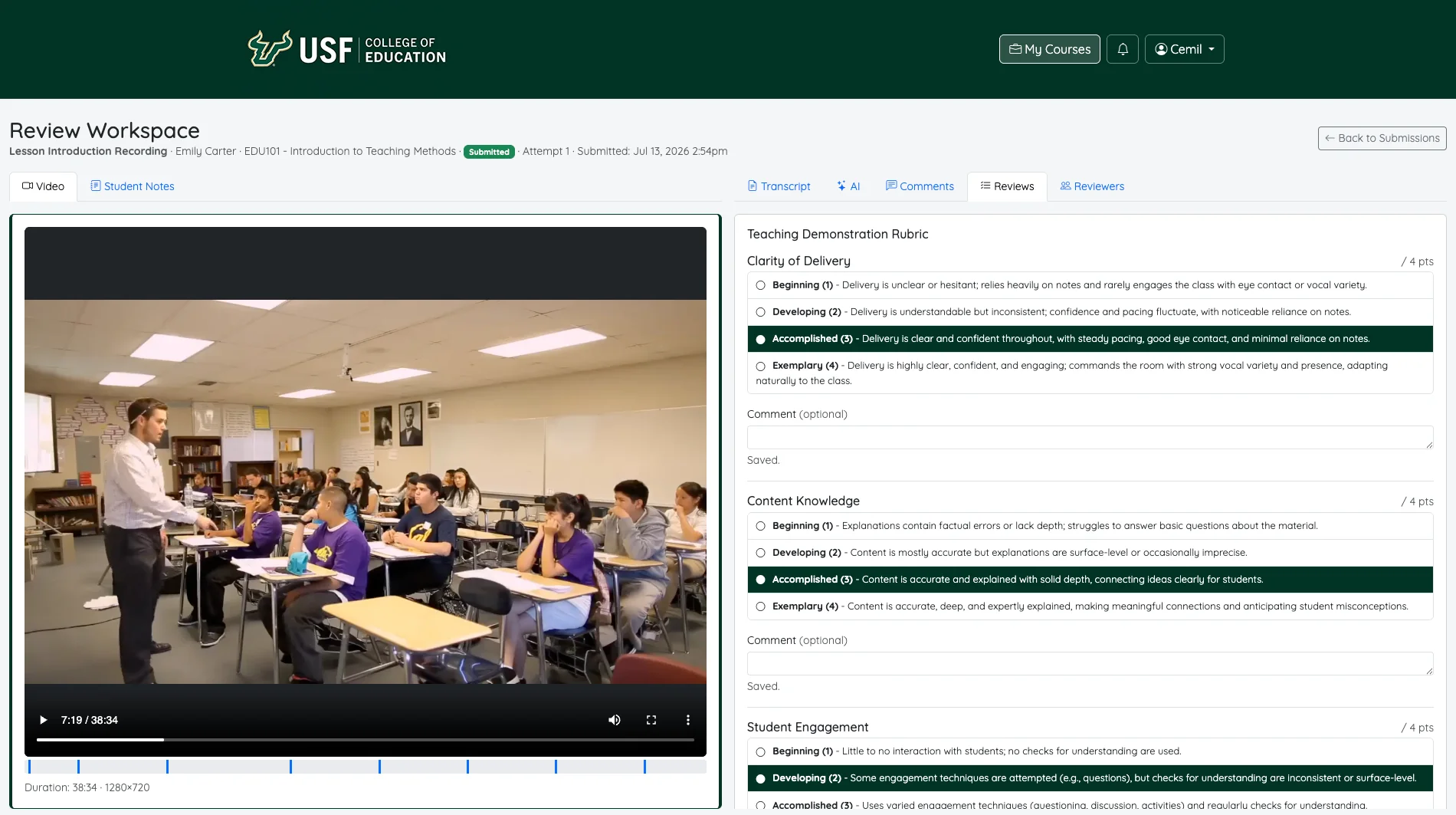
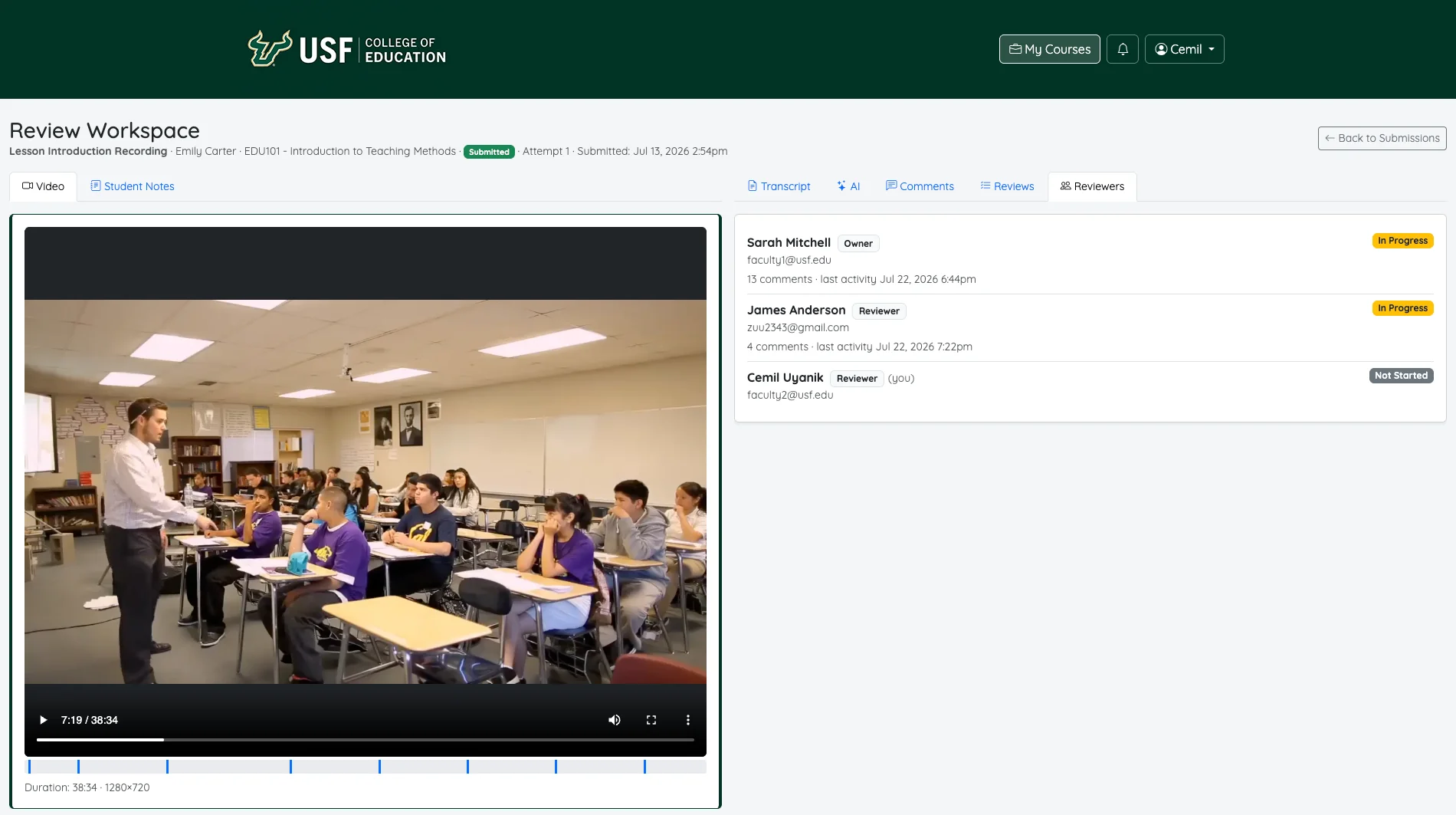
A focused review workspace

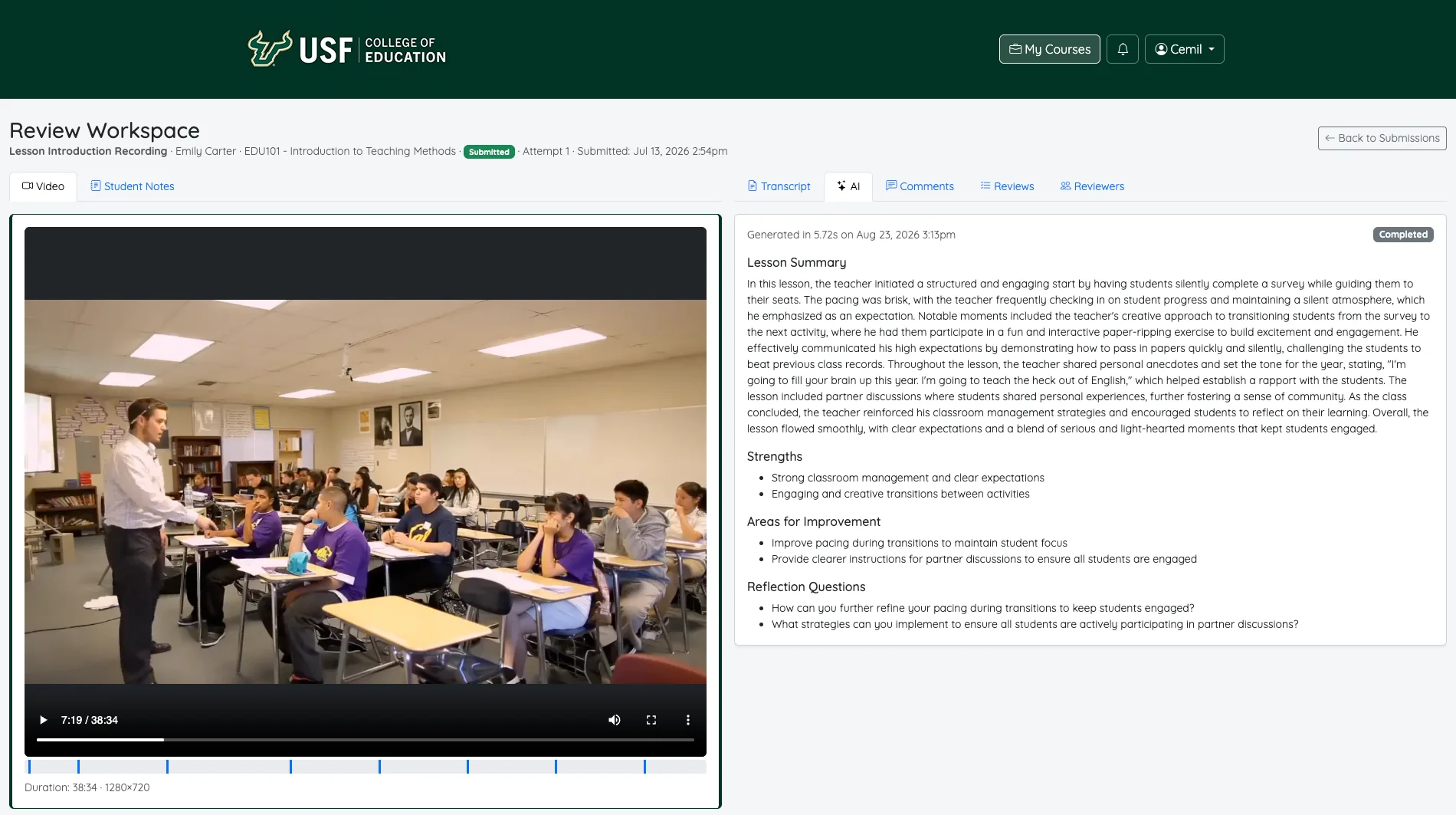
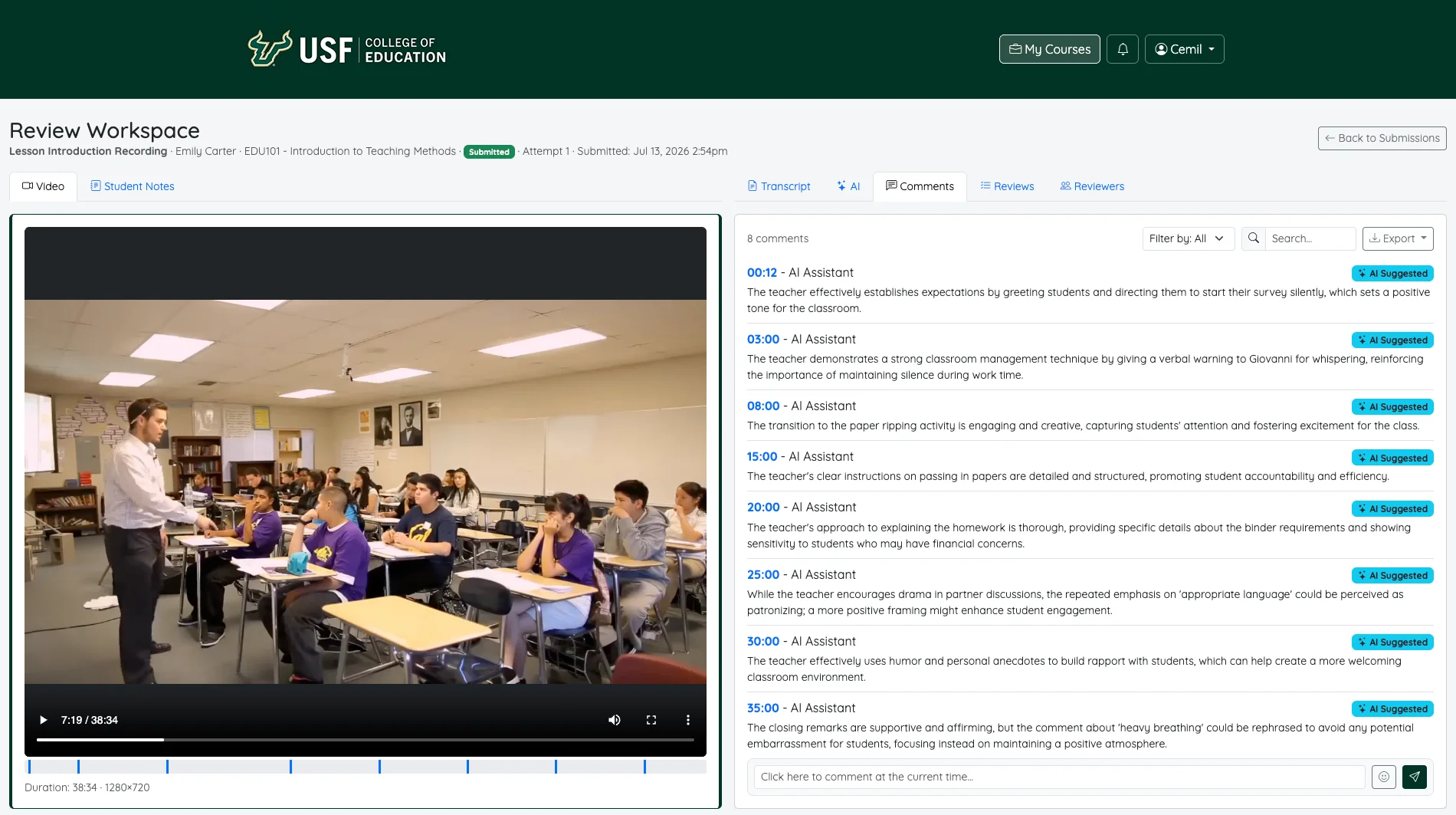
Video on one side, everything a reviewer needs on the other - transcript, AI summary, timestamped comments, and rubric - plus the rubric builder faculty use to set up an assessment. Screens below are from the current release.

Features

One platform for clinical observation and assessment

Every assessment centers on a teaching video. Each capability is labeled with what is available today.

Available

Video Observations

Candidates submit teaching recordings for structured review, feedback, and assessment, with timestamped comments, playback controls, and transcript navigation where available.

Available

Candidate Self-Evaluation

When faculty enable it, candidates comment on and score their own recording before reviewers do - building reflection into every observation. Self-evaluation never counts toward the grade.

Partially available

Mentor and Supervisor Feedback

Authorized clinical educators provide feedback, complete evaluations independently, and document candidate performance.

Today: Reviewers are identified per course as University Supervisor, Mentor Teacher, External Person, or Other. A simplified mentor view is in development.

Partially available

AI-Assisted Reflection

Transcripts, summaries, suggested feedback, and possible evidence aligned to assessment criteria - all subject to educator verification.

Today: Transcripts and summaries are available. Criterion-aligned evidence suggestions are in development.

Partially available

Rubrics and Performance Standards

A rubric is optional. Faculty build their own, pick one from the Rubric Bank, or adopt and edit an existing rubric - and align criteria with the FEAPs or program outcomes.

Today: Optional, custom, and reusable rubrics are available. Standards alignment is in development.

Partially available

Program Assessment and Reporting

Dashboards, assessment outcomes, candidate growth information, and exports for program improvement and accreditation evidence.

Today: Course and candidate reports are available. Program dashboards and data exports are in development.

How PRISM Works

From recording to final evaluation

Candidates record or upload their teaching. Reviewers watch, comment, and score independently. Faculty make the final decision.

  1. Step 1: Set up the assignment

    Faculty add instructions, dates, and reviewers - and choose a rubric, adopt an existing one, or use none.

  2. Step 2: Record or upload

    Candidates record in the browser or upload an existing video, with supporting documents.

  3. Step 3: AI prepares

    When enabled, AI produces a transcript, summary, and suggestions for reviewers to verify.

  4. Step 4: Self-evaluate

    If faculty allow it, candidates comment on and score their own recording.

  5. Step 5: Reviewers evaluate

    University supervisors and mentor teachers watch, comment at exact moments, and evaluate independently.

  6. Step 6: Faculty finalize

    Faculty review every evaluation and submit the final evaluation - or return it for revision.

  7. Step 7: Candidates see results

    Candidates see the final evaluation and any reviewer feedback faculty choose to share.

The rubric is your choice

Every assignment uses video. How it is scored is up to faculty.

Rubric options for an assignment
Option How reviewers evaluate
No rubric Timestamped comments, overall comments, and a recommendation.
Rubric Bank Pick a published rubric and score each criterion.
Adopt and edit Copy an existing rubric and adjust it for the assignment.
Build your own Define criteria, performance levels, and descriptors.

For Educators

Built around the people in clinical practice

Everyone sees only what their role requires. Access is granted per course by faculty or an administrator - a descriptive title never grants permissions on its own.

Faculty / Course Instructor

Creates assessments, manages assigned candidates, reviews submissions, and completes evaluations when authorized.

In PRISM today: Faculty role - available.

Program Coordinator

Oversees assessment configuration and outcomes for assigned programs.

In PRISM today: Program-level access is in development. Today this is handled by Faculty or an administrator.

University Supervisor

Observes candidates, provides feedback, completes assigned evaluations, and participates in final assessment when authorized.

In PRISM today: Reviewer role - available.

Mentor Teacher

Reviews assigned candidates and provides clinical feedback and assessments through a streamlined interface.

In PRISM today: Reviewer role - available. A simplified mentor view is in development.

Teacher Candidate

Completes required submissions, reviews feedback, and submits reflections or acknowledgments when applicable.

In PRISM today: Student role - available, including optional self-evaluation.

Institutional Administrator

Manages authorized institutional settings, users, reports, and system configuration.

In PRISM today: Platform Administrator - available.

AI Assistant Not a user role

Supports transcription, analysis, and feedback preparation. It is not a human user and not an independent evaluation authority: it never finalizes an evaluation, and its summaries and suggestions are never shown to candidates.

AI & Privacy

AI assists. Educators decide.

AI-generated observations are suggestions that require educator review. Faculty and authorized reviewers remain responsible for evaluation decisions.

Read about AI & privacy
  • Videos are not public

    Recordings are stored outside the public web directory and streamed only after a permission check on every request.

  • Role-based visibility

    Candidates see only their own work. A reviewer never sees another reviewer's evaluation.

  • AI is administrator-controlled

    AI processing can be turned on or off for the whole platform by an administrator.

See how a clinical assessment moves through PRISM

Walk through a complete example - from assessment setup to program results - using fictional demonstration data.

Accounts are provided by your program or institutional administrator.